
How to Improve Game Feel in AI Built Games
You describe your game idea, generate it, and it plays, but something feels wrong. The character moves stiffly, jumps lack punch, and collecting items does nothing exciting. Players notice immediately and quit fast. This off sensation comes from poor game feel, which is how actions respond and satisfy.
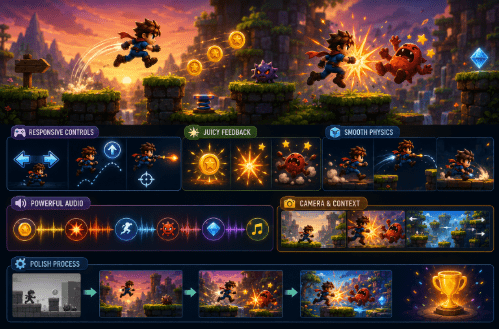
Good feel makes simple games addictive. Bad feel makes them forgettable. Fix it by adding specific details to your description: responsive controls, juicy feedback, smooth physics, and matching sounds. Update one thing, generate again, and test. No tech skills needed. After 5 to 7 tweaks, your game shifts from flat to fun, players stay longer, and share more.
Why Game Feel Makes or Breaks Your Game
Game feel is the invisible magic where tapping a button gives instant joy and movement flows naturally. Without it, even solid ideas flop. Basic descriptions create functional games but miss polish, jumps clip awkwardly, hits lack impact, and screens stay static. Players sense something cheap and leave.
Feel comes from four parts: input which is what you do, output which is what happens, physics which is how things move, and context which is how the world reacts. Balance them and play delights. Test by closing your eyes between actions. If you anticipate satisfaction, the feel is working.
Make Inputs Respond Instantly and Precisely
Delayed or mushy controls frustrate players first. They press and nothing happens, or too much happens. Sharpen inputs with clear descriptions so movement snaps to keys or taps without lag. Jumps should trigger exactly on release, with height slightly matching press duration for skill.
Here is how to describe precise response in your game setup. Arrow keys move instantly left, right, up, and down. Space jumps high on press with variable height based on hold time. For mobile, tap the left or right side of the screen for movement and tap the center for jumping. For shooting, the mouse aims smoothly and left click fires with under 0.2 second cooldown. For all games, set zero input delay and show a brief glow or outline on hover or press for confirmation.
Test by spamming inputs rapidly. Does it match your rhythm perfectly? Precise inputs build trust and let players focus on fun.
When using an AI no code game maker, the clarity of your description directly controls responsiveness. The more specific you are about timing, movement, and feedback, the better the generated game will feel.
Boost Output With Satisfying Visual and Physical Reactions
Actions need a visible payoff. Collecting or hitting without pop feels empty. Layer reactions for punch by adding particle bursts of 10 to 20 colorful sparks flying outward for 0.5 seconds on hit or collect. Add a light screen shake on impact and a brief flash. Make targets squish 20 percent on hit and bounce back with elastic ease. Let the player leave faint speed lines during fast moves.
Describe timing so effects peak at the action moment and fade quickly. Overdoing it risks clutter, so aim for subtle yet noticeable. Strong outputs reward the brain and make players crave the next hit.
Tune Physics for Natural, Pleasing Movement
Stiff or floaty physics break immersion. Good physics feel alive with weight, momentum, and bounce.
Adjust core properties so the player falls with realistic acceleration and lands with a short squash stretch. Jumps should carry forward glide and turns should skid slightly on the ground. Enemies can ragdoll on hit and roll away naturally. All motion should ease in and out smoothly.
Start conservative with medium gravity and light friction. Test jumps and runs. Does it feel grounded yet agile? Natural physics make controls shine.
Layer Audio for Emotional Punch
Silent games feel dead. Sounds sync actions and amplify feel. Match audio precisely by adding a crisp thud or ding a fraction of a second after collision, with volume scaling based on force. Include a low whoosh that ramps with speed and a footstep tap on landing. Use a high sparkle chime for UI and collectibles, with pitch rising as the combo count increases. Keep background music as a subtle loop that ducks under effects. Balance effects at around 80 percent loudness and music at around 40 percent.
For example, in Elastic Thief 2, the satisfying snap sound when the elastic stretches and releases, combined with a punchy impact effect when the thief grabs a target, makes every successful steal feel crisp and rewarding. A rising combo chime when you chain multiple grabs together keeps the momentum alive and pushes players to keep going. Without those tightly synced audio and visual cues, the same mechanics would feel flat even if the core gameplay was solid.
Test muted versus full audio. Sound should elevate the experience, not distract from it.
Use Camera and Context to Enhance Immersion
A static camera bores players while a smart view excites them. Add a smooth camera that trails the player at slightly above normal speed with a gentle bob on jumps. Include a quick zoom in on big hits and a global shake for explosions. Use parallax so background layers scroll at half the foreground speed for depth. Let close threats loom larger to create tension.
Make the context react too, so the world crumbles on heavy lands and dust puffs kick up on steps. Describe it as: the environment responds, dust puffs on each step. An immersive camera keeps eyes glued to the screen.
Test Feel Iteratively for Polish
Feel reveals itself in play, not planning. Follow a simple testing loop by doing 10 baseline runs and noting stiff spots. Then isolate tests by muting audio and dimming visuals to check whether core movement feels solid on its own. Have a friend play blind without any guidance and ask if it felt good. Aim for input to output lag under 50 milliseconds subjectively.
On Astrocade, you can regenerate fast, tweak one element, and compare immediately. After 3 to 5 loops, most games reach a polished feel.
Final Thoughts
Improved feel through precise inputs, juicy outputs, natural physics, synced audio, and an immersive camera elevates basic games into memorable ones. Describe deliberately and test relentlessly.
Start with your current game and pick one area, inputs, to describe better. Generate, feel the difference, and repeat. With steady attention to each layer of feel, your AI built game will shift from something players try once to something they rave about and keep coming back to.
