
A productive home workspace is not about adding as many accessories as possible. It is about removing the small problems that interrupt your day: a screen that sits too low, cables spread across the desk, too few laptop ports, or repeatedly reconnecting a monitor, storage drive and charger.
For students and remote workers, a compact connectivity accessory may be enough to make a laptop more practical at a desk. Creators, designers and other professionals who rely on multiple displays, large files and high-speed peripherals may need a more capable desktop expansion solution.
The best setup depends on how you actually use your laptop.
Start With a Comfortable and Organised Home Office
A laptop is built for portability, but its fixed screen and keyboard are not always ideal for long hours at a desk. When the screen sits too low, users may spend more time looking downward than they would with a separate monitor.
For longer working sessions, a few adjustments can make the workspace easier to use:
- Position the top of the screen around eye level where practical.
- Use a separate keyboard and mouse if the laptop is raised.
- Keep frequently used devices within comfortable reach.
- Route charging and display cables away from the main working area.
Cable clips, under-desk trays or simple routing along the back of the desk can also help keep the workspace organised.
Once comfort and organisation are addressed, connectivity often becomes the next limitation.
Solve Everyday Port Shortages With a Compact USB-C Hub
Many modern laptops have only a small number of built-in ports. That keeps the device slim and portable, but it can become inconvenient when you need to connect several accessories at the same time.
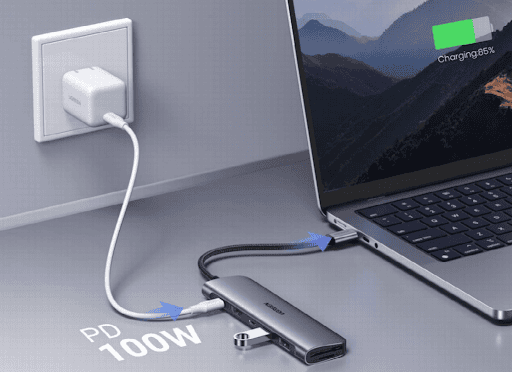
A compact usb hub can solve common port shortage issues by bringing several connections together through one accessory.
Typical devices that may need to connect to a laptop include:
- An external monitor
- A keyboard and mouse
- External storage
- SD or microSD cards
- A charger or other USB accessories
This type of setup is particularly useful for students, hybrid workers and people who regularly move between home, university, cafés and shared offices.
At home, it can help keep a monitor and frequently used accessories connected through one central point. When it is time to leave, the laptop can be disconnected without removing every peripheral individually.
Portability is the main advantage. A lightweight hub is easier to carry in a laptop bag and takes up less space than a permanent desktop expansion setup.
Match Connectivity to Real Working Scenarios
Specifications are more useful when they solve a specific problem.
For different users, that can mean very different things:
- Students: connect a larger monitor, storage device or memory card while working on assignments.
- Remote workers: keep a keyboard, mouse and display organised around one laptop connection.
- Hybrid workers: carry one compact accessory between home and the office instead of several adapters.
- Light content creators: transfer photos or video from memory cards and connect a larger screen.
- Entertainment users: connect a laptop to a TV or monitor for streaming or casual gaming.
A compact hub is therefore most valuable when it solves everyday connectivity problems without adding unnecessary bulk.
The key is to choose only the functions you regularly need. Extra ports add little value if they remain unused.
Know What the USB-C Port Actually Supports
Not every USB-C connection provides the same features.
USB-C describes the connector shape, while the underlying connection can support different capabilities, including:
- Data transfer
- Laptop charging
- External display output
- Connections to storage and peripherals
The laptop, cable and connected accessory all need to support the required function.
For example, some USB-C ports support video output while others do not. Charging capability can also vary considerably between devices.
Data speed is another important difference. Older USB 2.0 connections operate at up to 480 Mbps, while newer USB connections can provide several gigabits per second of theoretical bandwidth.
Faster interfaces can make a noticeable difference when moving large photo, video or project files, although actual performance also depends on the computer, storage device and cable.
Checking these details before buying helps avoid a common problem: choosing an accessory with the right physical connector but the wrong technical capability.
When a Professional Desktop Setup Needs More
A portable hub is not always enough.
Video editors, photographers, designers, developers and other professionals may use several high-bandwidth devices at the same time, such as:
- Multiple high-resolution monitors
- External SSDs
- Large media libraries
- Wired Ethernet
- Cameras and memory cards
- Audio equipment
- Other professional peripherals
In this situation, a more capable docking station can provide the additional connectivity and bandwidth needed for a permanent workstation.
The main benefit is not simply having more ports. A desktop dock can act as the central connection point for the workspace, helping reduce repeated plugging and unplugging when the laptop moves between mobile and desk-based use.
This type of setup is better suited to users who value expansion, bandwidth and a more permanent desktop environment over portability.
Why Higher-Bandwidth Connections Matter
Professional workflows can place much heavier demands on a laptop connection than everyday office tasks.
High-resolution displays, fast external storage and large media files all require bandwidth. When several demanding devices are active at the same time, the capabilities of the connection become more important.
Thunderbolt 5, for example, supports up to 80 Gbps of bidirectional bandwidth. Its Bandwidth Boost feature can provide up to 120 Gbps of transmit bandwidth for display-intensive workloads.
Higher bandwidth can be particularly useful for users who regularly work with:
- High-resolution or multiple displays
- Large 4K or higher-resolution video files
- Fast external SSDs
- Large photography libraries
- Several high-speed peripherals at once
Someone mainly writing documents, browsing the web or joining video calls is unlikely to need the same level of connectivity.
This is why product choice should follow the workload rather than simply selecting the accessory with the largest specification list.
Choose the Right Level of Expansion
For most everyday users, a compact USB-C hub offers a practical balance of portability and functionality.
A compact hub is generally suitable if you:
- Work mainly with documents, web applications and video calls.
- Use one external monitor.
- Need a few additional USB or card-reader connections.
- Frequently carry your laptop between different locations.
- Want to save desktop space.
- Do not regularly use several high-bandwidth peripherals at once.
A more capable desktop dock makes greater sense if you:
- Regularly edit video, photography or other large media files.
- Use several external devices simultaneously.
- Depend on multiple high-resolution displays.
- Need faster storage or wired networking.
- Keep your laptop connected to a permanent workstation for long periods.
- Value expansion and bandwidth more than portability.
Neither option is automatically better. They are designed for different workflows, budgets and levels of connectivity.
Keep the Rest of the Workspace Simple
Connectivity should improve the workspace rather than make it more complicated.
Once the laptop has the ports it needs, focus on a few practical basics:
- Keep frequently used equipment easy to reach.
- Route cables away from the main working area.
- Position displays comfortably.
- Reduce distracting reflections from windows or desk lighting.
- Avoid adding accessories that do not solve a real problem.
- Give chargers, storage devices and other accessories a consistent place.
Even a small home-office desk can work efficiently when each device has a clear purpose and a regular position.
Conclusion: Build Around the Way You Work
A productive laptop workspace starts with understanding what slows you down.
For students, remote workers and mobile professionals, a compact UGREEN connectivity solution can help solve everyday port shortages while keeping the setup portable and easy to manage. For creators and professionals working with multiple displays, large files and high-bandwidth peripherals, a more capable desktop expansion setup can provide the additional connectivity their workflow requires.
The goal is not to build the most complicated desk. It is to choose the right level of connectivity, organise the workspace around your daily tasks and create a setup that remains flexible as the way you work changes.
