
Security is one of the top priorities for homeowners, landlords and business owners. Whether you want to keep an eye on your gate, protect your shop from theft, monitor a construction site or simply check on your family while you are at work, a CCTV system provides peace of mind that locks and guards alone cannot. Modern cameras are more affordable and capable than ever: many record in high definition, see clearly at night and let you watch live footage on your phone from anywhere. But with so many types, resolutions and features on the market, choosing the right system can be confusing. This guide explains what you need to know before buying.
Why install CCTV cameras?
- Deterrence: visible cameras discourage burglars, vandals and trespassers.
- Evidence: recorded footage can help identify suspects and support police reports and insurance claims.
- Remote monitoring: watch your home, shop or office in real time from your phone.
- Business management: monitor cash counters, stock rooms, deliveries and customer service areas.
- Family safety: check on children, elderly relatives and domestic workers, while respecting their privacy.
Because CCTV systems range from single Wi-Fi cameras to multi-camera professional installations, prices vary widely. If you are shopping in Kenya, comparing current offers for a CCTV camera or complete kit helps you see the difference between Wi-Fi, solar, 4G and wired systems, compare resolutions and features, and understand what installation services cost. Knowing the typical price range makes it easier to choose a system that fits both your security needs and your budget.
Wired vs wireless systems
HD analogue systems with a DVR
These systems connect cameras to a digital video recorder (DVR) using coaxial cables. They are affordable, reliable and widely used in homes and small businesses. Modern HD analogue cameras deliver good image quality at a lower cost than IP systems.
Best for: budget-conscious installations with several cameras.
IP camera systems with an NVR
IP cameras send digital video over network cables to a network video recorder (NVR). Many use Power over Ethernet (PoE), which delivers both power and data through a single cable, simplifying installation. IP systems generally offer higher resolutions, smarter features and better scalability.
Best for: businesses, larger properties and anyone who wants the best image quality and advanced features.
Wi-Fi cameras
Wi-Fi cameras connect to your home network without video cables and usually store footage on a memory card or in the cloud. They are easy to install and ideal for small homes, apartments and indoor monitoring. However, they depend on a strong Wi-Fi signal and still need a power source.
Best for: apartments, small homes, shops and renters.
4G and solar cameras
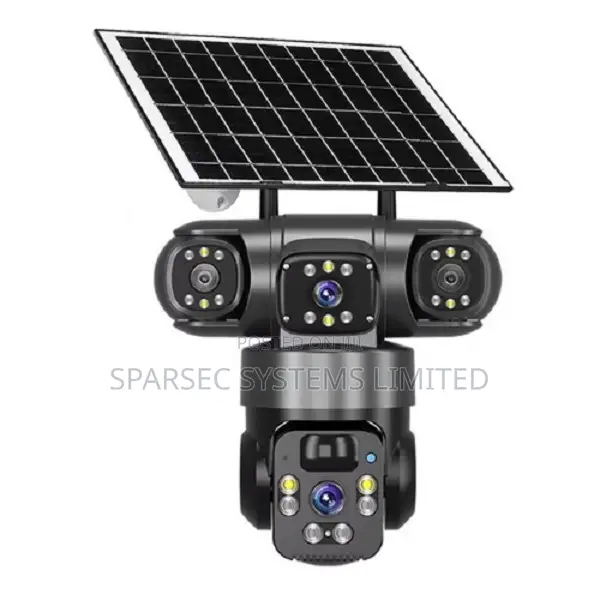
These cameras use a mobile data SIM card instead of Wi-Fi and are often powered by a solar panel and battery. They are perfect for farms, construction sites, gates and remote plots with no electricity or internet.
Best for: rural properties, farms, construction sites and off-grid locations.
Camera styles
- Bullet cameras: cylindrical and highly visible, which makes them a strong deterrent. Ideal for gates, perimeters and parking areas.
- Dome cameras: discreet and harder to tamper with, commonly used indoors, in shops and in offices.
- Turret cameras: similar to domes but without the glass cover, which reduces night-time glare.
- PTZ cameras: pan, tilt and zoom to cover large areas, controlled remotely or automatically. Used in warehouses, compounds and large premises.
- Mini and hidden cameras: small and discreet, but must be used responsibly and legally.
Key features to consider
Resolution
Resolution determines how much detail the camera captures. 2 MP (1080p) is a basic standard, 4 MP and 5 MP offer noticeably sharper images, and 8 MP (4K) provides the most detail for identifying faces and number plates. Higher resolutions also require more storage.
Night vision
Most cameras use infrared (IR) LEDs to record in black and white in the dark. Check the stated night-vision range. Colour night vision cameras use sensitive sensors or small white lights to record colour footage at night, which makes it easier to identify clothing and vehicles.
Field of view and lens
A wide-angle lens covers more area, while a narrower lens captures more detail at a distance. Use wide-angle cameras for rooms and compounds and narrower lenses for gates and driveways where you need to identify faces or number plates.
Storage
- Hard drives in DVRs and NVRs: store footage from multiple cameras. The required capacity depends on the number of cameras, resolution and how many days of recording you want to keep.
- Memory cards: common in Wi-Fi and 4G cameras, suitable for single cameras.
- Cloud storage: keeps footage safe even if the recorder is stolen, but usually requires a subscription and a stable internet connection.
Efficient video compression, such as H.265, reduces storage needs without greatly affecting quality.
Remote viewing and alerts
Most modern systems include a mobile app for live viewing, playback and motion alerts. Smart detection features can distinguish between people, vehicles and other movement, reducing false alarms from animals, trees or passing shadows.
Audio
Some cameras include microphones and speakers for two-way communication, which is useful at gates and front doors. Be aware that recording audio raises additional privacy considerations.
Weather resistance
Outdoor cameras must withstand rain, dust and heat. Look for weatherproof ratings such as IP66 or IP67, and vandal-resistant housings for cameras within reach.
Planning your installation
- Identify key areas: main gate, front and back doors, parking, perimeter walls, cash points, stock rooms and entrances.
- Decide on the number of cameras: a small home may need two to four cameras, while businesses and compounds may need more.
- Choose camera positions: mount cameras high enough to avoid tampering but low enough to capture faces clearly.
- Avoid backlighting: cameras facing bright light or the sun can produce dark, unclear images.
- Protect the recorder: place the DVR or NVR in a hidden, secure location so intruders cannot easily remove it.
- Plan for power backup: a UPS, inverter or solar backup keeps the system recording during power outages.
Suggested setups for different properties
- Apartment: one or two Wi-Fi cameras covering the entrance door and main living area, with memory card or cloud storage and motion alerts to your phone.
- Standalone home or maisonette: four to eight cameras covering the gate, driveway, front and back doors and perimeter, connected to a DVR or NVR with a hard drive and power backup.
- Small shop or salon: a dome camera over the counter and cash point, one covering the entrance and one inside the stock area, with remote viewing so you can check in while away.
- Office or larger business: an IP system with PoE cameras, higher resolution at entrances and parking areas, and smart detection alerts.
- Farm, plot or construction site: solar-powered 4G cameras covering gates, stores and equipment areas, since power and internet may not be available.
These are starting points. Walk around your property, note weak spots and adjust the number and type of cameras to match your situation.
DIY or professional installation?
Wi-Fi and solar cameras are often simple to set up yourself. Larger wired systems usually benefit from professional installation, which ensures proper cabling, secure mounting, correct camera angles and configuration of remote viewing. Ask installers about warranties, after-sales support and maintenance services.
Keeping your system secure
- Change default usernames and passwords immediately.
- Use strong, unique passwords and enable two-factor authentication where available.
- Update the firmware of cameras and recorders regularly.
- Limit who has access to the app and footage.
- Buy from reputable suppliers and avoid unknown brands without support.
Privacy and responsible use
CCTV should protect people and property without invading privacy. Avoid pointing cameras into neighbours’ homes, bathrooms or other private spaces. Businesses and organisations that record customers, employees or visitors should inform people with clear signage and handle footage responsibly, in line with Kenya’s data protection laws. If you are unsure of your obligations, seek guidance from the Office of the Data Protection Commissioner or a legal professional.
Maintenance tips
- Clean camera lenses regularly to remove dust, cobwebs and water spots.
- Check that all cameras are recording and that the date and time are correct.
- Inspect cables and connectors for damage.
- Test playback periodically so you know footage is available when you need it.
- Replace hard drives before they fail, as they wear out over years of continuous recording.
The bottom line
A well-planned CCTV system is one of the most effective ways to protect your home, family and business. Choose the right type of system for your property, prioritise good resolution, reliable night vision and secure storage, plan camera positions carefully and keep your system secure and well maintained. With the right setup, you can enjoy greater security and peace of mind every day.
