

Small businesses often need attractive visuals for product launches, seasonal promotions, newsletters, and social media campaigns, but professional design resources are not always available. For entrepreneurs managing several responsibilities at once, an best ai image generator can offer a way to explore creative ideas, test different visual approaches, and prepare concepts before committing time and money to a final design. The real advantage comes from using these tools strategically, with a clear understanding of the business objective and the customers the visuals need to reach.
Start With the Marketing Goal, Not the Image
A common mistake in visual marketing is creating an attractive graphic before deciding what it should accomplish. A promotional image designed to introduce a new product has a different purpose from one intended to announce a discount, explain a service, or encourage customers to register for an event.
Before developing any artwork, businesses should identify the action they want customers to take. This decision helps determine the image’s subject, composition, tone, and supporting message.
For example, a local bakery promoting a new range of pastries might need warm, inviting imagery that highlights the products. A software company announcing a new feature may benefit from a cleaner visual concept that communicates simplicity and organization.
The intended audience matters just as much. Visuals for a professional service may need a restrained and credible appearance, while a campaign aimed at younger consumers might use more expressive colors and energetic compositions. These are starting points rather than rigid rules; the final direction should reflect the brand’s actual customers and personality.
A clear brief also makes revisions more efficient. When the objective is established in advance, it becomes easier to reject images that look impressive but do not support the campaign.
Develop a Reusable Visual System
Businesses frequently produce graphics for several channels at the same time. A campaign may need a website banner, an email header, a social media post, and a product announcement. Creating every asset independently can lead to inconsistent colors, layouts, and visual styles.
A reusable visual system provides a practical solution. It defines a few recurring elements, such as the brand’s color palette, typography, photography style, and preferred composition. These guidelines help separate the identity of the business from the specific message of an individual campaign.
Consistency does not mean repeating the same image everywhere. Instead, each asset should be adapted to its purpose while retaining recognizable characteristics.
Consider a small skincare business launching a new product. Its website banner might emphasize the packaging and product benefits, while a social media graphic could focus on the ingredients or the intended customer experience. Both assets can use related colors and visual treatments without becoming identical copies.
Businesses should also plan for different display sizes. A detailed design may look effective on a desktop screen but become difficult to understand on a mobile device. Keeping the main subject prominent and avoiding unnecessary decoration can improve clarity across formats.
Use Visual Prototypes Before Investing in Final Production
One useful application of AI-assisted design is early-stage prototyping. Before commissioning a full campaign, a business can explore several possible visual directions and determine which one best communicates its message.
Imagine a home furnishings retailer planning a spring promotion. The initial concepts might include a bright minimalist interior, a natural setting with organic textures, and a more colorful arrangement emphasizing individual products. Reviewing these directions can help the marketing team decide which atmosphere best suits the campaign.
Prototypes also improve communication between business owners and designers. Instead of describing an idea entirely in words, the owner can share a visual reference and explain what should change. This may reduce misunderstandings during the creative process.
Dreamina is one option businesses can explore when developing image concepts from written descriptions. The important step is to assess each result against the original brief rather than choosing an image solely because it appears polished.
AI-generated visuals should be treated as drafts when accuracy, precise branding, or detailed product representation matters. Packaging, logos, product dimensions, and other important features may require manual correction or replacement with approved assets.
Compare Tools Against Real Business Requirements
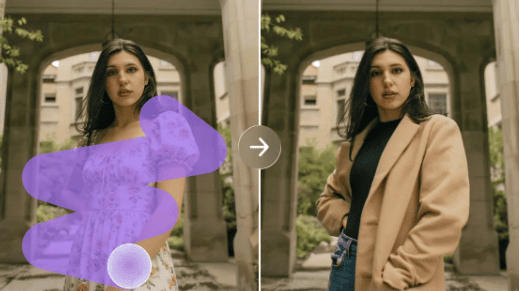
Choosing an image-generation platform is easier when businesses evaluate tools against a specific task rather than relying on general popularity. A retailer preparing promotional concepts may need different features from a consultant creating illustrations for educational material.
When evaluating the best free ai image generator options, start by testing a small number of platforms with a comparable creative brief. Assess whether the results follow the instructions, maintain a coherent composition, and provide enough quality for the intended use.
Cost is only one consideration. Businesses should also examine generation limits, export resolution, available editing features, watermarks, and licensing conditions. A service that allows free experimentation may still impose restrictions on commercial use or downloaded assets.
The time required to correct the output matters, too. A tool that generates an appealing concept quickly may become less useful if the image consistently contains distorted product details or requires extensive manual editing.
A practical comparison should answer four questions:
- Does the output support the campaign’s objective?
- Can important visual details be controlled or corrected?
- Is the final file suitable for the intended platform?
- Are the cost and usage conditions appropriate for the business?
These criteria help entrepreneurs select a tool based on practical value rather than promotional claims.
Create Campaign Variations Without Losing Consistency
Marketing teams often need several versions of a campaign to suit different audiences or channels. AI-assisted image creation can help explore alternative concepts without requiring a completely new creative brief for every variation.
For example, an online stationery store might test a minimalist arrangement for its website and a brighter, more expressive concept for a social media promotion. A business could also experiment with different backgrounds, lighting, or visual compositions while keeping the same central product.
However, generating more variations does not automatically improve campaign performance. Too many alternatives can create unnecessary work, especially when there is no clear method for deciding between them.
A better approach is to define what each variation is intended to test. One version might emphasize the product, another its setting, and a third the emotional atmosphere associated with its use. The team can then review the results against a consistent set of criteria.
Any claims about improved engagement or sales should be supported by actual campaign data. A visually appealing concept is not, by itself, evidence that customers will respond more positively.
Keep Brand Accuracy and Customer Trust at the Center
Visual experimentation should never come at the expense of truthful representation. This is especially important for businesses selling physical products or advertising services with specific features.
An artificially generated product image may introduce colors, accessories, dimensions, or details that do not match the real item. Publishing such an image without correction could create misleading expectations and damage customer confidence.
Businesses should use approved product photography wherever exact representation is necessary. Generated backgrounds, conceptual illustrations, and decorative elements can sometimes complement authentic assets, provided the finished image remains accurate.
Branding requires similar care. Logos and text generated within an image may contain inconsistencies, so they should be checked carefully. Adding official brand assets separately often provides better control over their appearance.
Copyright and licensing should also be reviewed before publication. The terms governing generated content differ between services, and images found online may have restrictions even when they are publicly accessible. Businesses should confirm that they have the appropriate rights for their intended commercial use.
Build a More Efficient Visual Production Workflow
A repeatable process can help small teams produce marketing assets without allowing experimentation to consume the entire workday.
Begin with a short creative brief that defines the audience, objective, main subject, and desired visual style. Generate a limited number of concepts, compare them against the brief, and select the strongest direction for refinement.
Next, check the practical requirements of the destination. A website hero image may need a wide composition, while a mobile advertisement may require a vertical format. Prepare each version deliberately rather than stretching one design across every channel.
Before publication, review the image for factual accuracy, visual consistency, spelling, readability, and licensing. Keep the approved final files separate from experimental drafts so the team can identify which assets are ready to use.
Businesses should also track the time spent creating and correcting visuals. If a particular workflow consistently requires extensive manual repair, another tool or a conventional design process may be more efficient.
Make Every Visual Serve a Clear Purpose
Affordable image creation can expand the creative options available to small businesses, but its value depends on how thoughtfully it is used. A clear marketing objective, a consistent visual system, and a reliable review process are more important than producing the largest possible number of graphics.
AI-assisted tools can help entrepreneurs explore ideas, communicate creative preferences, and prepare preliminary campaign assets. They work best when combined with accurate business information, careful editing, and a clear understanding of customer expectations.
By focusing on relevance rather than novelty, small businesses can develop visuals that communicate their message more effectively while making better use of limited resources. The aim is not simply to create more images, but to create the right images for the right audience at the right moment.
